
What's new?
Reactivating Inactive Venues
You can now reactivate venues that have previously saved as inactive without needing to re-create the same venue.
Applies to: All - New Functionality
Why does it matter?
When you attempt to delete a venue that is still in use, the system automatically sets it to inactive instead. Previously, once a venue became inactive, there was no option to reactivate it.
This update gives you more flexibility to manage your venues, allowing you to bring previously inactive venues back into use without having to create new ones.
How it works
- Head to the Activities tab and select Manage Venues.
- Use the list toggle to switch to Inactive and view all venues that have been made inactive.
- Find the venue you want to reactivate and select Edit/Reactivate on the right-hand side.
- Reactivate the venue to make it available for use again.
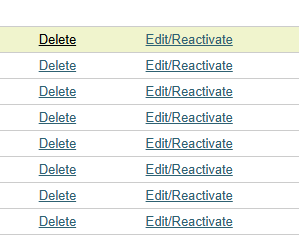
Please note: editing a venue will automatically reactivate it.
What’s new?
Field Label Update: Referral Identifier
Applies to: All - label change
The field label "Referral identifier" in the List Referrals section has been renamed to "Registration ID".
Why does it matter?
This change makes the field clearer and easier to understand, helping users identify the information more easily.
How it works
When viewing the List Referrals section, you will now see "Registration ID" instead of "Referral identifier".
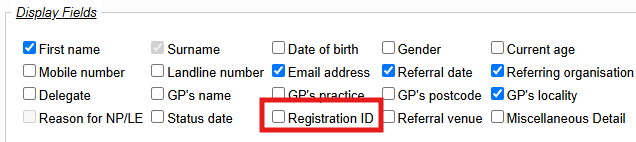
This is a label change only, so there are no changes to the underlying functionality. The field will continue to work as before.
What’s new?
Field input change - NHS number
Applies to: All - field input change in the Referral Record
We’ve updated the NHS number fields in the Referral Record to accept only 10-digit numbers, helping reduce input errors and keep patient records consistent.
How it works
When referring a patient, under Patient Details, the NHS number field will now only accept 10 digit numbers.

Fixes and improvements
This release also includes fixes to issues that could affect your day-to-day work in ReferAll. Here’s what’s been resolved.
Searching by Phone Number (mobile number specifically)
We’ve fixed an issue where searching by mobile number did not always return matching referrals. Once this release is live, searches using a mobile number will return the matching referrals as expected.
From the Search tab

Search referrals by Phone Number (Landline or Mobile) field
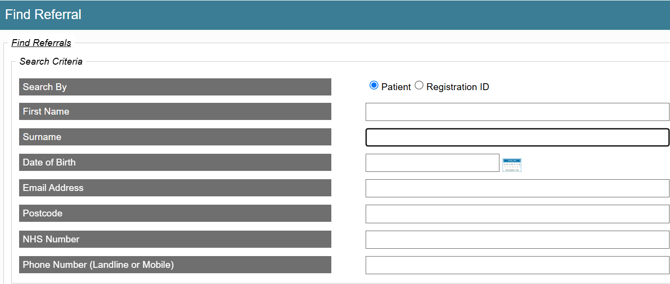
Please note: when you save a landline or mobile number in the Referral Record, all formatting, including spaces and brackets, is automatically removed.
Phone numbers already saved will not be updated automatically. You may need to update data if you find the field isn't bringing back the referral/s you expect.