
1. Ensure you are using the latest URL
In April 2026 we updated our platform's URL, so users who have saved/bookmarked the old URL will need to delete this and save our new one.
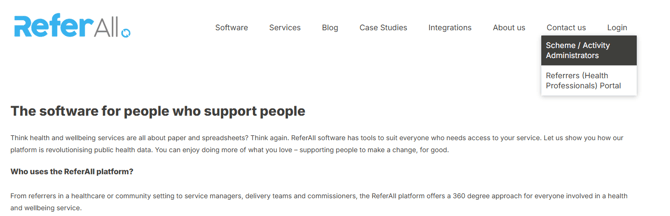
The best way to access our platform is by navigating to our main website: ReferAll Platform then finding Login and Scheme/Activity Administrators, as this will always take you straight to the platform. You can then choose to save this URL to your browser:
2. Linking your Microsoft Account
Once your team’s Super Scheme Admin has granted you access (more details on this here), you then have two options to login.
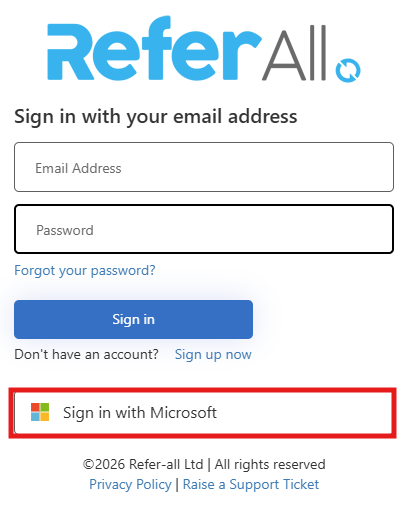
The quickest method would be to use our Sign in with Microsoft option. Providing your linked Microsoft account shares the same email address you originally registered with, this option will take you straight to the platform.
3. Signing in with your email address
Alternatively, you can choose to sign in with your email and password. As above, the email address must be the email you originally registered with, associated with your organisation.
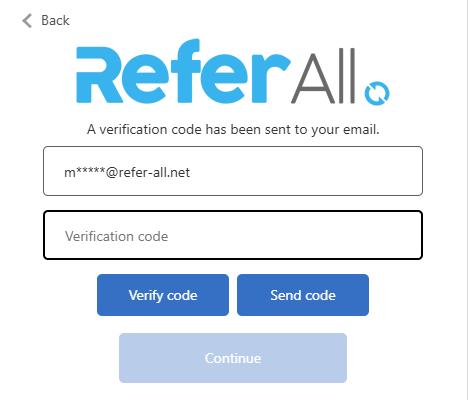
Once you have entered your credentials, you will be prompted to enter the verification code sent to your email.
Verification codes are generated from noreply@mail.secure.refer-all.net
Please ensure your organisation has whitelisted this email address and there are no restrictions preventing you from receiving this email.
Then enter your verification code here, before accessing the platform:
4. Account Lockouts
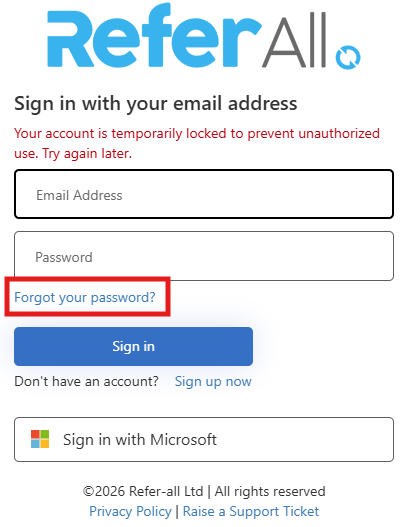
To keep your data safe, we restrict access when the password is entered incorrectly too many times. After three unsuccessful attempts, your account will automatically be locked for 15 minutes. This block is to prevent unauthorised access and we cannot remove this block for you. You can either wait and try again, or reset your password by clicking Forgot your password?
5. Resetting your password
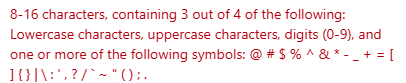
To protect your data, we enforce strict password requirements, including a minimum of 8 characters and your password must contain a variation of letters, numbers and symbols. Many customers use their browser's Password Manager to store their passwords, as long as this is deemed safe by their organisation.
If you have read this article and ensured all criteria is met for accessing the platform, but you are still unable to login, please raise raise a support ticket with our team to investigate for you further.